MudShark is a good fit for an earthworks estimator in Australia or the UK who works on a Windows PC, prices in Cubit Estimating, or wants a 3D and 4D walkthrough and clash checks on trenches. Bedrock's Earthwork Pro suits a team that bids from civil PDFs with labelled contours, uses Macs as well as Windows laptops, and wants the earthworks priced in the same app the proposal comes out of.
Who makes MudShark?
MudShark is desktop earthworks estimating software from BrightBox Software, an Australian company. Buildsoft sells it in Australia and BSS sells it in the UK, so your quote comes from whichever of them covers your market. We're talking about that earthworks program here, not any other product called MudShark.
Bedrock is a takeoff, estimating and proposal app for trade contractors, and Earthwork Pro is its earthworks module. It covers the bid: reading the plan, building the surfaces, modelling the site and sending cut, fill and import or export to the estimate.
MudShark pricing in Australia
Buildsoft publishes MudShark's Australian prices:
- A$230 a month billed annually, or A$275 a month billed monthly on a 12-month term, both plus GST.
- MudShark with Trench: A$250 a month billed annually, or A$299 billed monthly.
- A perpetual licence, though Buildsoft doesn't publish its price.
There's a 14-day trial.
Worked example: one estimator on MudShark with Trench for a year, billed annually, is A$250 x 12 = A$3,000, or A$3,300 with GST. Billed monthly it's A$299 x 12 = A$3,588 before GST. For UK pricing or the perpetual option, ask BSS or Buildsoft.
Bedrock Premier, which includes Earthwork Pro, is US$249 a month or US$2,490 a year in the US, with unlimited team seats. Local prices for Australia, New Zealand and the UK are on our pricing page, so compare in your own currency there. Our trial is 7 days and needs a card.
Windows, Macs and the licence check
MudShark needs Windows 10 or later and 8 GB of RAM. It isn't cloud software: it installs on the PC, and BrightBox says a Mac needs a virtual machine to run it. The fixed licence checks in online every 15 days.
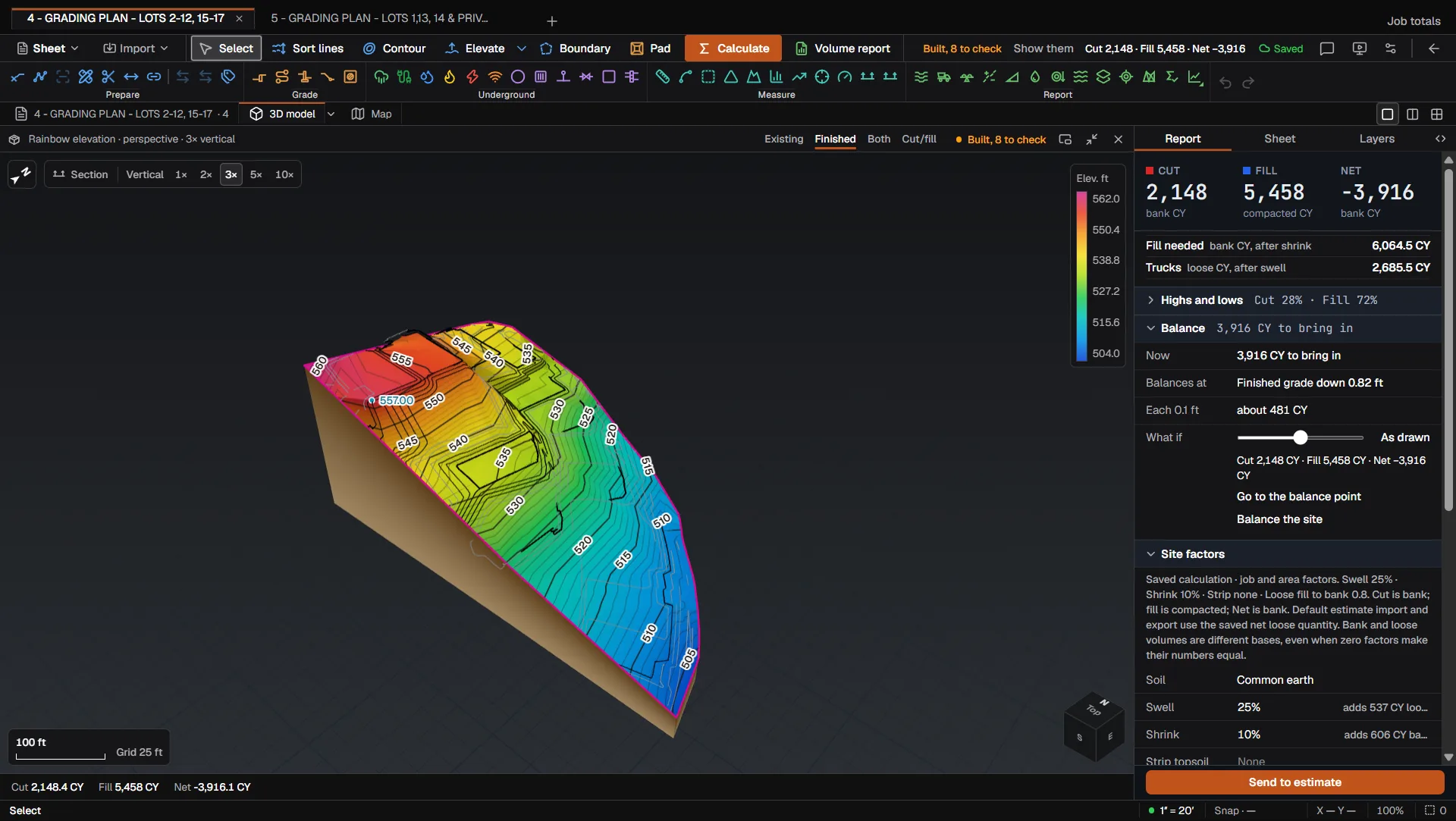
Earthwork Pro runs in a web browser on Windows or Mac, with nothing to install. The estimator can open a job on a MacBook at home and the owner can check it on the office PC the next morning. Jobs can be set up in metric (cubic metres and square metres) or imperial; the screenshots on this page come from a US job in feet and cubic yards.
Reading the plan
BrightBox says MudShark captures contours with a single click or by tracing. We couldn't confirm from its published pages how the elevations get onto those contours, so ask Buildsoft or BSS to show you on one of your own plans during the trial.
Earthwork Pro reads the elevation labels on a civil PDF and ties each one to its contour, including labels the CAD export drew as linework instead of text. It joins dashed and broken contours and reads spot grades marked FS, TW, TC or FF. A contour with a missing label takes its elevation from its neighbours and is flagged for review, and a run of unlabelled contours is numbered by dragging a line across them. Auto identify, in Beta, sorts the lines into existing and proposed for you to check.
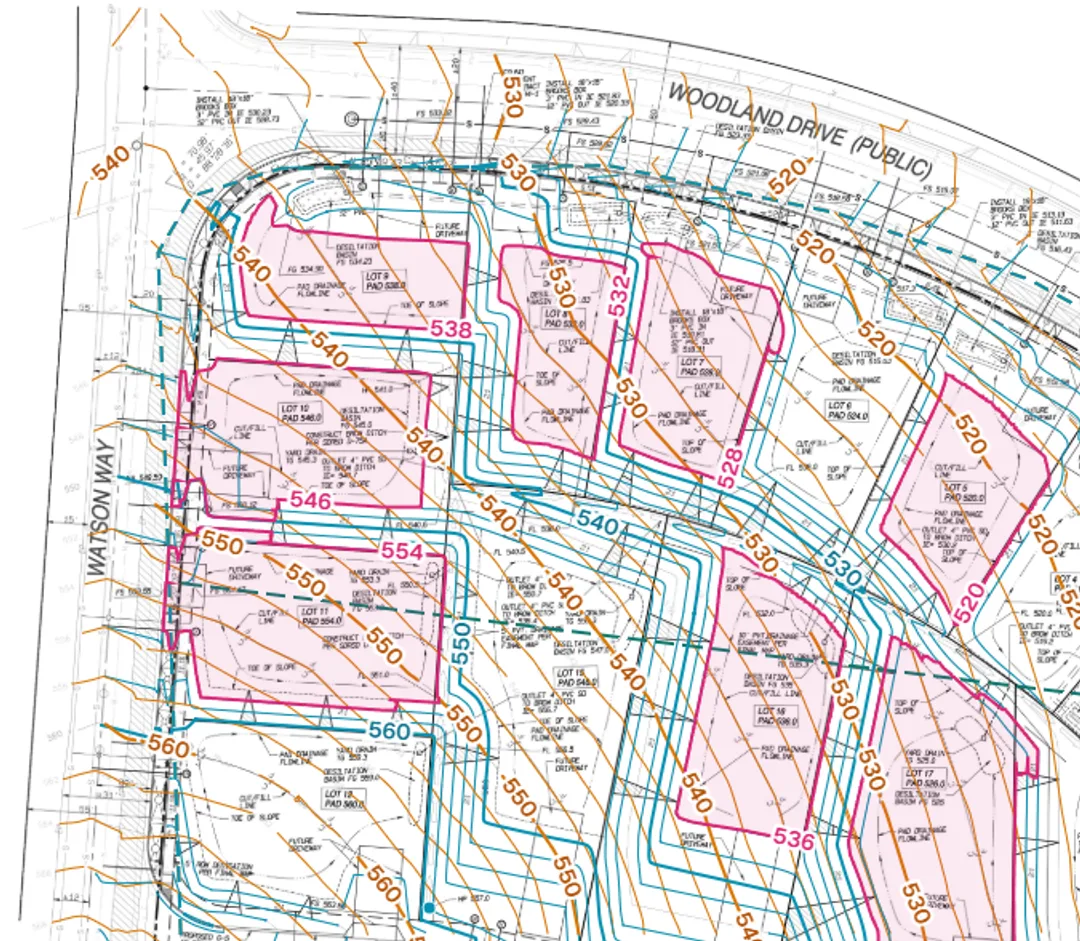
Besides PDF, Earthwork Pro imports DXF, MicroStation V7 DGN and survey points (CSV, TXT, XYZ, PTS, ASC). MudShark lists PDF, DWG 3D objects, DXF, drone data and boring logs. If your consultants send DWG files with 3D objects, MudShark imports them; with Bedrock you save the DWG as DXF first.
3D, trenches and ground conditions
This is MudShark's strongest ground. It has a 3D and 4D walkthrough and clash detection on trenches, and it handles soil strata and imported boring logs. If staging the works in 4D or checking new services against each other is part of how you price, give those features most of your trial time.
Earthwork Pro's 3D model shows existing, finished, both, or cut and fill, with cut and fill depth contours, slopes and water flow, and cross sections export as PDF or CSV. Services are laid out as storm, sewer, water, gas, electric and communications runs with five structure types, depth by inverts or cover, side slopes or working room, and bedding and pipe zone backfill. Soil borings and layers are part of the model, and boring logs can be read out of a geotechnical report for you to check.
Cubit, Excel and the estimate
MudShark exports to Excel and to Cubit Estimating. If your business already prices in Cubit, that link is a genuine reason to stay with MudShark.
In Bedrock the estimate is in the same app. You choose which quantities to send (bank cut, fill, net import or export, strip and topsoil, fine grade, over-excavation, trench excavation and bedding) and they arrive on the job's estimate as line items labelled Earthwork Pro, priced with your own cost data. Send again after a design revision and any line you've already priced is left alone. The proposal is built from that estimate, and the won job carries on into budgets and schedules.
Coordinates and machine control
Earthwork Pro knows 754 coordinate systems, including MGA for Australia and the New Zealand, UK and Ireland grids, so the plan, the cut and fill and the boundary sit over satellite imagery in the right place. The field download is a ZIP of open files: LandXML 1.2 and 3D-face DXF surfaces, DXF R12 and LandXML linework, stake points as CSV, a Google Earth KMZ and your surveyor's calibration file passed through. It's sorted into folders for Trimble, Cat, Topcon/Komatsu/Deere, Leica, Unicontrol and iDig, and the brand's office software or your dealer makes the native machine file.
We didn't find a machine-control export listed for MudShark. If you need one, check with Buildsoft or BSS.
The differences at a glance
| MudShark | Bedrock Earthwork Pro | |
|---|---|---|
| Price | A$230 a month billed annually or A$275 monthly on a 12-month term, plus GST; A$250 or A$299 with Trench | Local prices on our pricing page; US$249 a month in the US |
| Trial | 14 days | 7 days, card required |
| Runs on | Windows 10 or later; Mac through a virtual machine | Web browser on Windows or Mac |
| Licence | Fixed licence that checks in online every 15 days | Nothing to install |
| DWG | Imports DWG 3D objects | Save as DXF first |
| Elevations from a PDF | Ask Buildsoft or BSS | Labels read and tied to their contours |
| Link to estimating | Excel and Cubit Estimating | Estimate and proposal in the same app |
| Machine-control export | None listed; check with the reseller | Open LandXML, DXF and stake points, a folder per brand |
Try both on the same job
Take a plan you've already priced through MudShark and upload the same sheet to a 7-day Bedrock trial. Read the contours, draw the same boundary and compare the volumes. If the numbers agree and Bedrock got there faster, that's your answer. If Cubit or the 4D walkthrough is central to how you work, that may settle it the other way. The Earthwork Pro page shows how it reads a civil PDF.