If your company has a modeler who lives in AGTEK, keeps the machines loaded and runs SmartDirt on the job, stay with AGTEK. Nothing in this article will change that. If you're an estimator who gets a civil PDF on Tuesday, has to price the dirt, the paving and the storm by Friday, and would rather not buy a workstation to do it, Bedrock's Earthwork Pro was built for you. It runs in a browser and puts the yards straight onto the estimate.
That's the short version. The rest of this page is the detail: what each one does with the same grading plan, what they cost, and where each one falls short.
What AGTEK is in 2026
AGTEK has been doing earthwork takeoff since 1981 and has been part of Hexagon since 2018. It isn't one program anymore. The desktop line is Gradework (takeoff, 3D models, machine-control files and reports), Underground for utilities, Highway for alignments and cross sections, and Reveal, which includes Reveal Transform, an AI plan-prep tool released in March 2026. Around those sit field and production apps: SmartDirt puts the 3D model on a phone or tablet, SmartPlan shows sheets and cut/fill maps, SmartTrack follows equipment, and Trackwork plans and tracks production.
One date matters if you're still on the older software: AGTEK ends support for the Sitework 4D platform (Earthwork 4D, Materials, Underground, Highway and Trackwork 4D) on January 1, 2028, and offers trade-in credit toward Gradework and Reveal. A lot of shops will be choosing their next earthwork tool in the next year either way.
Bedrock is a different kind of product. It's a takeoff, estimating and proposal app for trade contractors, and Earthwork Pro is the earthwork module inside it. It does the bid-stage work: read the plan, build the surfaces, model the site, get bank cut, fill and net, and send them to the estimate. It doesn't have field apps or drone processing.
The same grading plan in both
Say the engineer sends a 14-sheet civil set as a PDF, and sheet C-3 is the grading plan. Here's roughly what happens next in each.
In AGTEK
AGTEK's own Vector PDF guide lays out the classic route in Gradework: import the PDF, scale it, vectorize the linework, trace the perimeter, clean up the existing contours, then the design lines, perimeters and regions, then compute. Vectorizing is the automatic part. Elevations go onto the contours by hand; Gradework marks the first point you type as entered and interpolates the rest.
Reveal Transform takes a bigger bite out of that. According to the Reveal 1.6 release notes, it reads the text and spot elevations on the sheet, assigns contour elevations from their labels, fills in the unlabeled intermediate contours from the interval, and shows a status view that greys out any line still missing an elevation. You still sort the layer data into categories, clean out the lines that aren't contours one page at a time, pick sample dashes so dashed contours join correctly, and force-join or delete the bad pieces. Then the job goes to Gradework for perimeters, regions and the calculation. Transform is a separate application from Gradework.
In Bedrock
The PDF is already in the job, because it's the same plan set you use for the rest of the takeoff. You open the grading sheet in Earthwork Pro and set the scale with two clicks on a known dimension.
Earthwork Pro reads the contour lines and their elevation labels, including labels the CAD export drew as linework instead of text, ties each label to its line, and joins dashed or broken contours back into single lines. Auto identify, which is still marked Beta, sorts the contours into existing and proposed for you to check. A contour with a missing label gets its elevation from the contours on either side and is flagged for review. If a run of contours has no labels at all, you drag a line across them and they're numbered from the interval. Spot grades (FS, TW, TC, FF) are read off the sheet too.
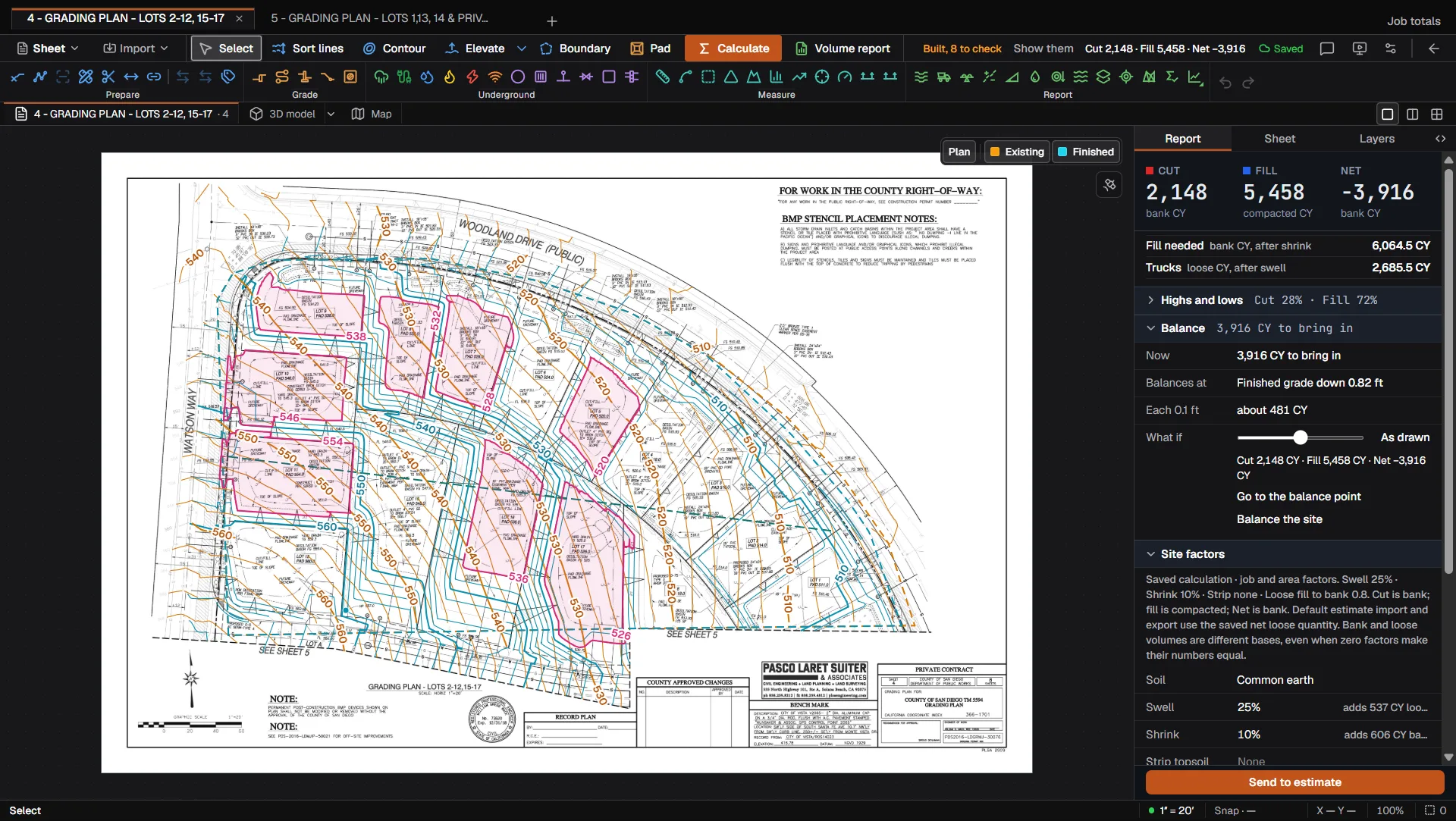
Then you draw the limit of grading, pads, retaining walls, curbs and ponds on the sheet, calculate, and send the quantities to the estimate.
Both tools still need a person to check the contours. The difference is where the work happens: AGTEK splits it across Reveal Transform and Gradework on a Windows workstation, while Bedrock does it in one screen in a browser, next to the rest of the estimate.
Side by side
| AGTEK | Bedrock Earthwork Pro | |
|---|---|---|
| Where it runs | Windows 10 or 11, 64-bit desktop | Web browser on Windows or Mac |
| Computer it asks for | Gradework: 16 GB RAM minimum, 32 GB recommended. Reveal: 32 GB RAM and an RTX-class card with 8 GB of video memory | A current laptop or desktop with an up-to-date browser |
| Contour labels read from a PDF | Yes, in Reveal Transform | Yes, built in |
| Contours sorted into existing and proposed | Manual, by layer and selection | Auto identify (Beta), then you check |
| DWG, LandXML, drone and point cloud import | Yes | No. PDF, DXF, MicroStation V7 DGN and survey points |
| Utilities | Underground | Built in: storm, sewer, water, gas, electric, communications |
| Roads | Highway | Built in: centerline, profile and typical section |
| Machine control files | Native Trimble, Topcon and Leica files, plus LandXML | Open LandXML, DXF and stake points, in a folder per brand |
| Field and production apps | SmartDirt, SmartPlan, SmartTrack, Trackwork | No |
| Estimate and proposal | Exports to estimating programs | In the same app |
| Starting price | Around $650 a month for a shared key on a one-year subscription, per AGTEK | $249 a month in Bedrock Premier |
| Users | A shared key several people can work from; more capacity costs more | Unlimited team seats in Premier |
The AGTEK hardware figures are from AGTEK's hardware requirements page. AGTEK's downloads are Windows installers; it doesn't list a Mac version.
How much does AGTEK cost?
AGTEK does publish a starting point. On its own pricing page, AGTEK says a shared key that several users can work from, with training and support, runs around $650 a month on a one-year subscription. It also says a full setup ranges from a few thousand to tens of thousands of dollars depending on the products and how many people use them, and that three-year terms and short-term overflow licences are available.
Training is priced separately. AGTEK's hands-on classes are three days at $1,100 per day per person, and its online seminars are $595 per day per person. There's also free self-paced video training in the AGTEK Community.
Bedrock's Earthwork Pro comes with Bedrock Premier, which is $249 a month or $2,490 a year in the US (other countries are on the pricing page), with unlimited team seats. That price also covers the rest of the app: takeoff for the other trades, assemblies, the cost database, the estimate, proposals and the CRM. The tutorial videos are in the app and free.
A rough first-year comparison for a small shop that sends one estimator to a hands-on class:
| First year, example | AGTEK | Bedrock |
|---|---|---|
| Software | About $7,800 (AGTEK's ~$650 a month starting figure x 12) | $2,490 (Premier, paid yearly) |
| One person, three-day class | $3,300 | Not needed; videos in the app |
| Total | About $11,100 | $2,490 |
Your AGTEK quote will depend on the modules and users you need, so treat that column as a floor, not a quote.
Where AGTEK is the better choice
We'd rather you pick the right tool than the wrong one from us. AGTEK is the stronger choice when:
- You load the machines yourself. AGTEK writes native Trimble (TTM), Topcon and Leica files. Bedrock gives you open LandXML, DXF and stake-point files that your surveyor, dealer or the brand's office software turns into native files.
- Your engineers send CAD, not PDFs. AGTEK opens DWG, LandXML, Trimble and Topcon surfaces, MicroStation and drone point clouds. Bedrock opens PDF, DXF, V7 DGN and point files today. A DWG has to be saved as DXF first.
- The work continues after the bid. SmartDirt, SmartTrack and Trackwork follow the job into the field. Bedrock's job tools cover budgets, schedules and field reports, but not machine tracking or a 3D model on the operator's phone.
- You have a modeler on staff who knows Gradework well. Forty-plus years of depth is real, and so is a trained person's speed in a tool they know.
Reviews of AGTEK tend to praise its accuracy, reports and support. The complaints that come up most are the price for a small contractor and the time it takes to get productive.
Where Bedrock is the better choice
- The PDF is what you get. Most bid invitations to subs include the civil set as a PDF. Earthwork Pro starts there and reads the labels for you.
- You price more than dirt. Paving lifts, curb and gutter, flatwork, utility trenches and the dirt end up on one estimate and one proposal, instead of being exported and retyped.
- Your estimators don't sit at one workstation. Anyone on the team can open the job in a browser on a Windows laptop or a Mac.
- You want to know the price before the sales call. It's on our pricing page, with a 7-day trial.
What ends up on the estimate
This is the part that decides bid day. The hillside plan in the picture above calculates to 2,148 bank cubic yards of cut and 5,458 compacted cubic yards of fill, so the job needs about 3,916 bank yards brought in. The report also says the site would balance with the finished grade 0.82 ft lower, which is a number worth a phone call to the engineer.
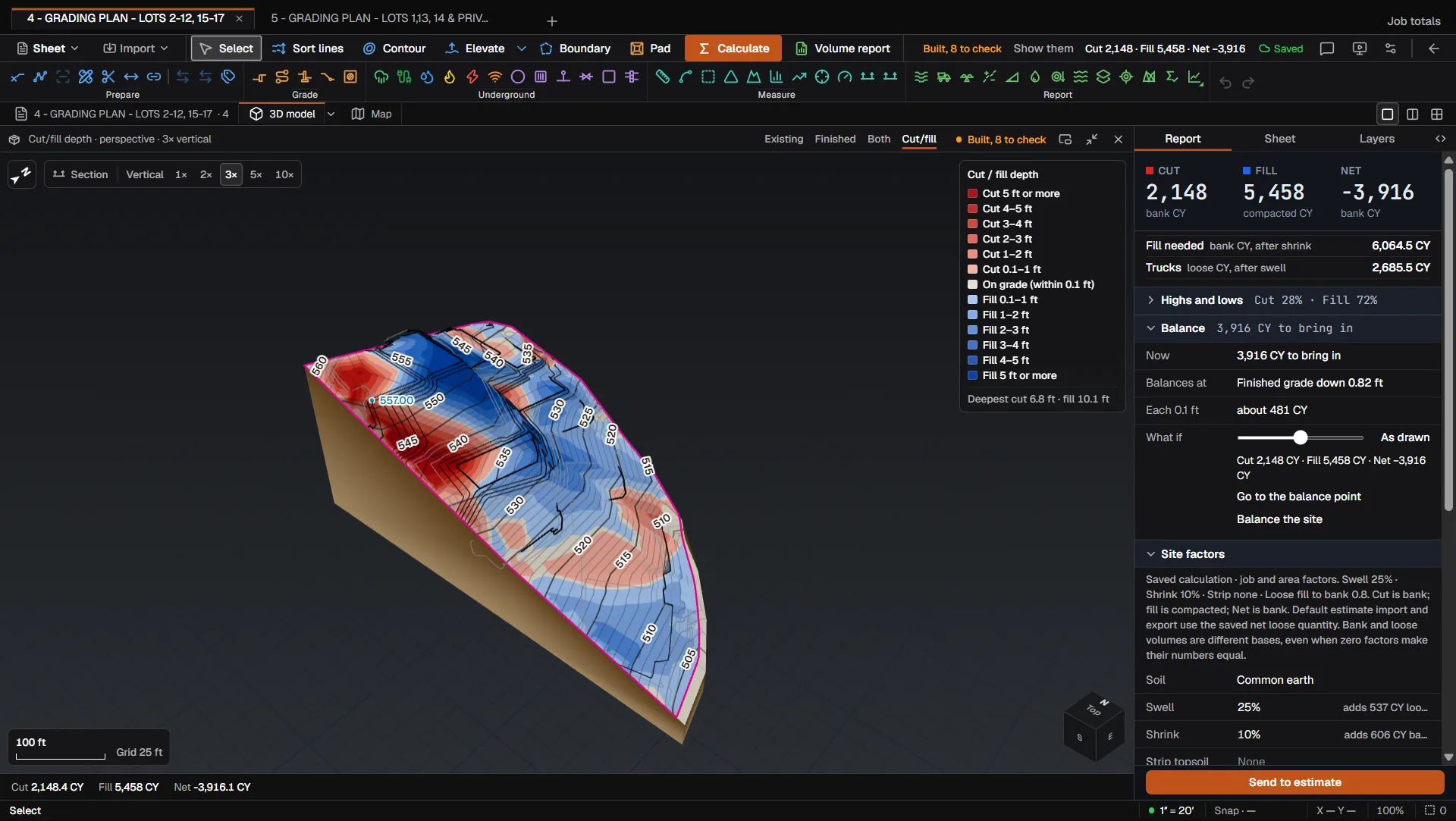
In Bedrock you pick which quantities to send (cut, fill, import or export, fine grade, strip and topsoil, over-excavation, trench excavation and bedding, pad area, wall face) and they land on the job's estimate as line items labeled Earthwork Pro. You price them with your own cost data. If the plan changes and you send again, a line you've already priced isn't overwritten.
In AGTEK, the reports are flexible and you can export them to an estimating program. That works, but it's a second program and a hand-off, and hand-offs are where numbers drift on a tight bid.
Machine control: native files and open files
This is the biggest practical difference after the bid. AGTEK builds the native model a Trimble, Topcon or Leica machine loads.
Earthwork Pro's field download is one ZIP for the surveyor or the machine: existing and proposed surfaces as LandXML 1.2 and 3D-face DXF, linework as DXF R12 and LandXML, stake points as CSV (PNEZD or PENZD), a Google Earth KMZ, your surveyor's calibration file passed through untouched, and a manifest with checksums. It's sorted into a folder per brand: Trimble, Cat, Topcon/Komatsu/Deere, Leica, Unicontrol and iDig. Those are open formats, so the brand's office software or your dealer makes the native file, and the first load gets checked before anyone grades to it.
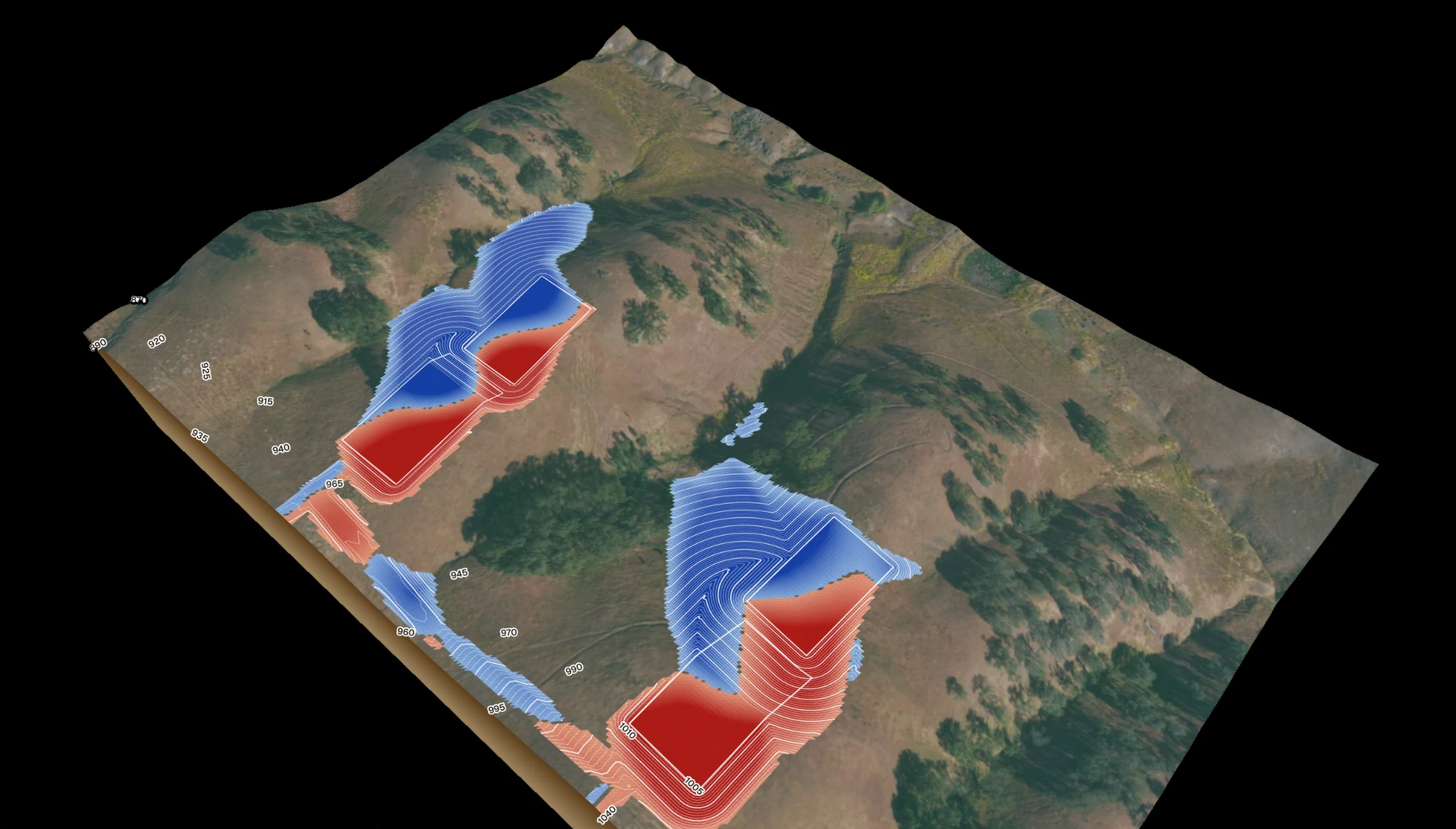
If you run the machines on your own jobs every week, that extra step adds up, and AGTEK earns its price there. If the surveyor or the GC handles machine control, open files are usually what they want anyway.
Moving work from AGTEK to Bedrock
You don't have to rebuild old jobs to try it. AGTEK exports DXF linework and CSV points, and Earthwork Pro imports both, so you can bring an existing surface across and check the numbers against what AGTEK gave you. For new bids, start from the PDF.
A sensible trial is a job you've already bid in AGTEK: upload the same grading sheet, read the contours, draw the same limits and compare the cut and fill. If the numbers land where you expect and it was faster, you'll know. If not, you've lost an afternoon.
Start a 7-day trial or read how Earthwork Pro reads a civil PDF.